From Paper Sketch to SQL Crack: A Bedtime Build Story
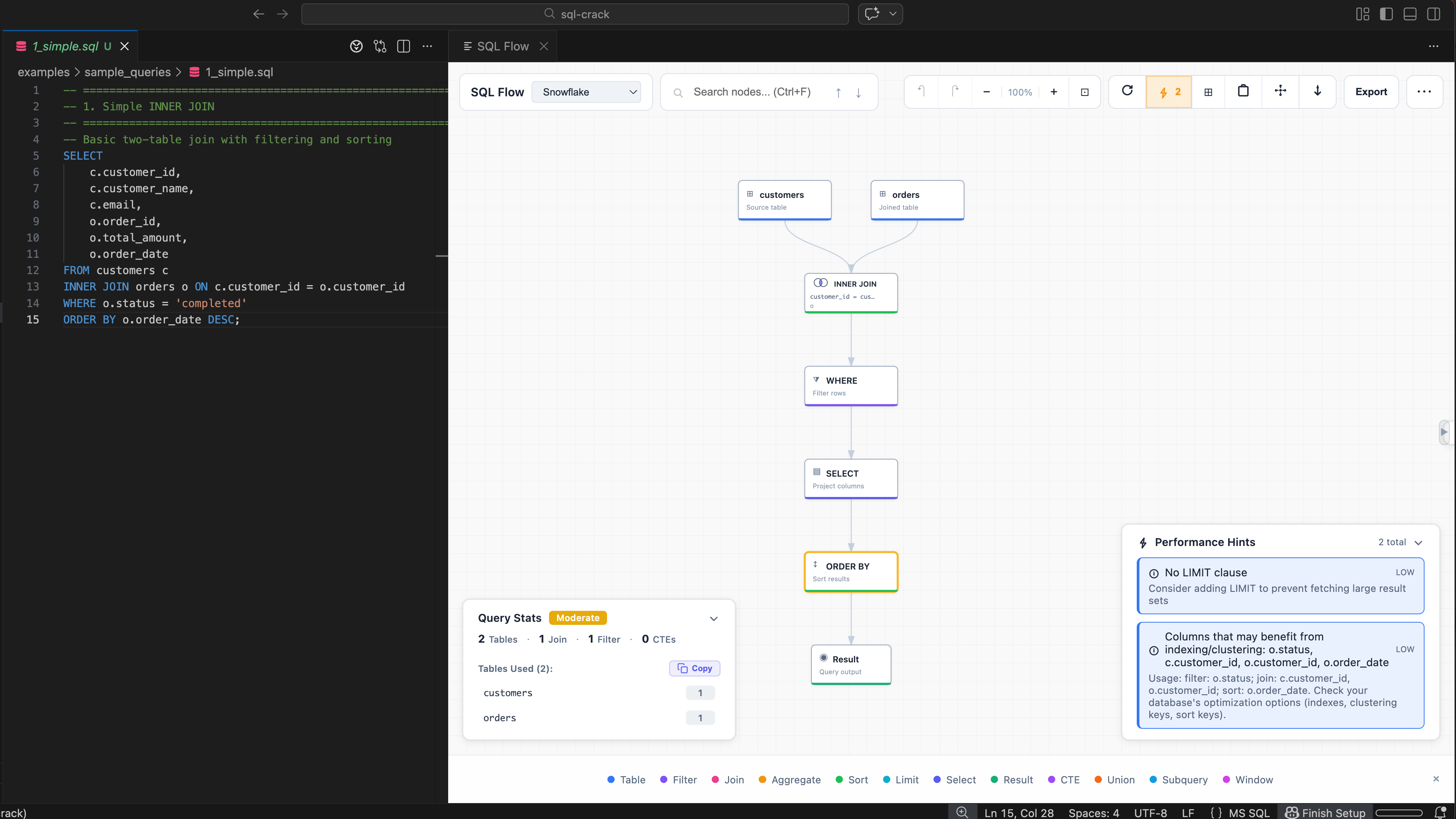
I didn’t start SQL Crack with a startup plan. Honestly, I started it because I kept seeing the same pain for years and got tired of it.
The Pain That Never Changed
I’ve been in data and platform engineering for 15+ years. Long enough to have started with COBOL and DB2, long enough to have lived through Teradata, Hive, Snowflake, Databricks — the whole evolution. As a Snowflake account admin, I spent years helping hundreds of users with performance tuning, query optimization, and cost control. And across all of it, one pattern never changed:
SQL gets big, and understanding it fast is hard.
When I was junior, I used to sketch joins on paper just to figure out what was going on. Draw the tables, draw the arrows, trace the data. Some seniors I admired could read massive queries and optimize them in minutes. I always wondered — why don’t we have a clean way to see SQL logic quickly?
That thought stayed with me for a long time.
The Spark
Then one day I came across JSON Crack. A clean, visual way to explore JSON. And I thought: do we have something like this for SQL?
I searched. Some tools existed, but they were web-only, required uploading your SQL to a server, or didn’t integrate into the editor. None combined local-first privacy with in-editor visualization — something that could take a query, any query, and turn it into a visual flow you could actually read. Right where you already write SQL.
So I decided to build it.
The Constraints
There was one problem: I’m not a frontend person. No VS Code extension experience. No website experience. I had the vision but not the muscle memory.
And I had a hard rule from day one — this stays a side project. No mixing with office work. Nights and weekends only.
Actually, even the hardware matters here. I was using my old 2014 Windows laptop before this. Booting alone took forever sometimes. During Thanksgiving 2025, I bought a new Mac. That changed everything. Suddenly I could build daily and commit regularly. Before the Mac, I’d do a handful of commits per year. After it, almost daily.
But the real constraint? My 3-year-old toddler.
If you have a toddler, you know how it goes. Most coding happened after bedtime. Late nights, early weekend mornings, small time windows. Sometimes 20 minutes, sometimes two hours. Repeat.
Paper to Prototype
The first version was embarrassingly simple: two tables — employee and department — with a basic join. First sketched on paper, then drawn in Excalidraw, then built as a proof of concept.
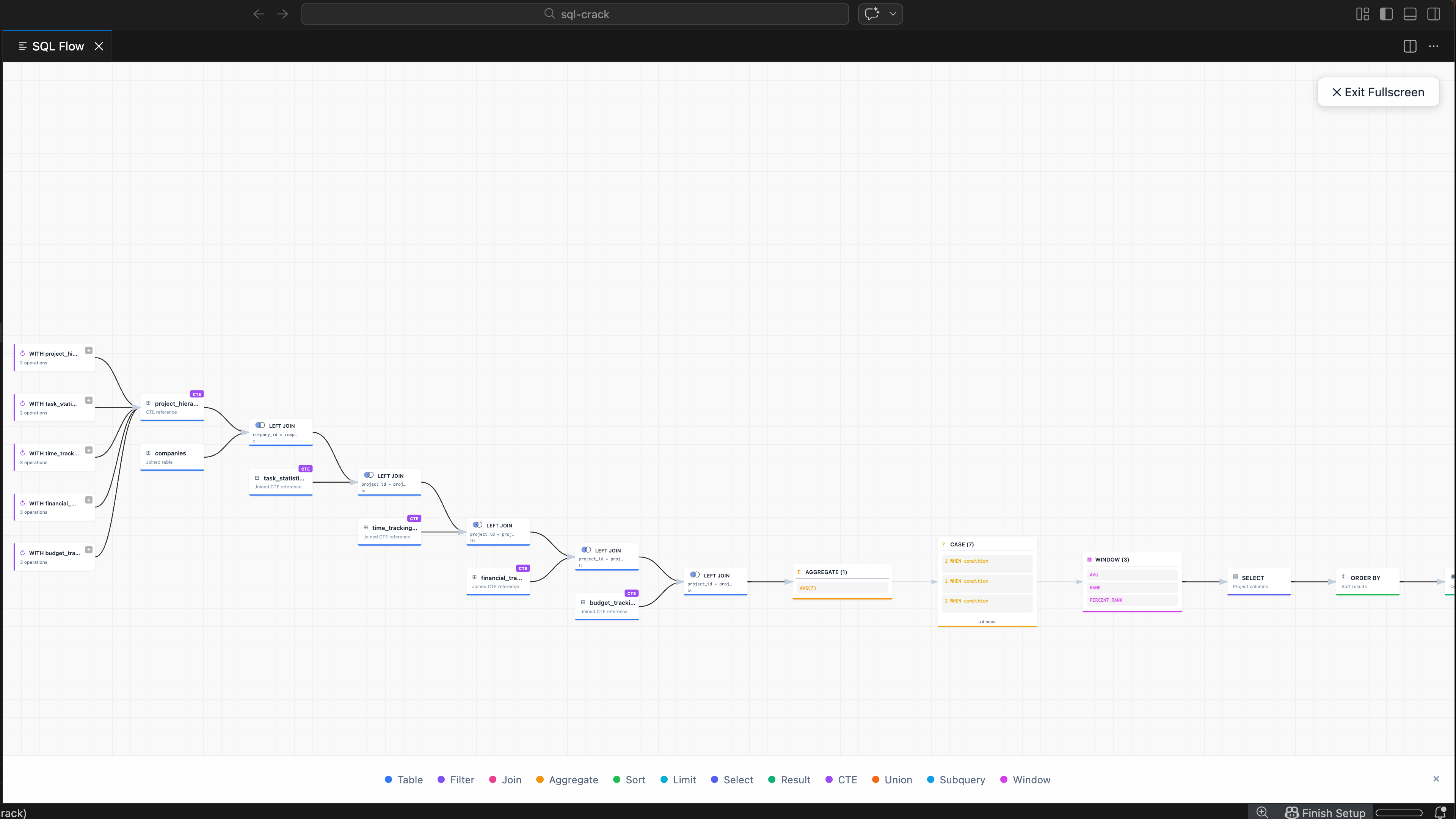
From that tiny starting point, it grew step by step. Joins, subqueries, CTEs, multi-query files, query stats, hints, exports, compare mode, themes, lineage. I even added tiny Venn-style join hints, because honestly, join types are just easier to understand that way.
Building it as a VS Code extension was deliberate — that’s where SQL lives. Right next to the code. No context switching, no copy-pasting into a separate tool.
I also had a clear constraint from day one: local-first, always. No data collection. No sending queries to any server. Table names, column names, query logic — all of that can be sensitive. For anyone working in environments where data privacy matters — this had to process everything locally. The extension runs entirely in your editor. On the website, your SQL text is parsed locally in the browser and is never uploaded by the parser.
AI-Assisted, Human-Directed
Early development was heavily AI-assisted — roughly 70-80% of the initial code came from Claude Code. Some tools were good for speed. Some hallucinated. Some confidently said “done” when the feature was half-broken. One time, the test output itself looked fake — passing results that weren’t real.
After the Codex app release, my workflow shifted a lot toward Codex for iterative back-and-forth and cleanup. I also tried Cursor, GLM, OpenCode, and others along the way. I made a couple of impulse subscriptions at 2 AM on weekends because I was too hyped to sleep. After a while, I found my rhythm. The tools that stuck were the ones I could iterate with — question, refine, push back. The ones that just generated walls of code without understanding the intent fell away fast. AI wrote a lot of the early scaffolding, but every architectural decision, every tradeoff, every “this doesn’t feel right” moment — those were mine.
When the Code Fought Back
Here’s the thing about building fast: you accumulate debt fast too.
After months of feature work, renderer.ts had grown to 9,686 lines. sqlParser.ts was over 6,200 lines. Reviewing anything became painful. Context windows broke. Debugging felt like archaeology.
It was obvious: this is no longer “just ship features.” It needs real engineering. Vibe coding gets you speed, but refactoring gets you survival.
So I refactored. Not once — multiple times. First the workspace panel, because the tabs had become carbon copies of each other. Same 150px header chrome, same search layout, same stats badges — a user switching tabs could barely tell anything changed. I ripped that apart and gave each view its own identity: distinct headers, visual accents, purpose-built content.
Then the graph UX. Focus and trace buttons lived in two places at once — the header and the selection panel. On narrow viewports, the header buttons overlapped with search. The fix wasn’t adding a third surface. It was removing the header icons entirely. Subtractive design. Simpler, not more complex.
Then the big files themselves. Split modules. Centralized utilities — especially color and theme tokens, because hardcoded hex values scattered across thousands of lines were a maintenance nightmare. Added real test coverage, because manual testing stopped scaling once SQL Flow and Workspace both got big.
The result: renderer.ts dropped ~63%, from 9,686 to around 3,500 lines. 2,000+ tests passing. No regressions caught by the test suite. Feature work became safer, reviews became possible again, and I could actually move forward instead of fighting the codebase.
From Single Query to Workspace
Initially, SQL Crack was only SQL Flow — single query visualization. But my day-job experience kept pushing a bigger idea.
Real SQL projects aren’t one query. They’re dozens of files that read from the same tables, feed into each other, and break in cascading ways when someone changes a column name.
That’s how Workspace Dependencies was born. Right-click a SQL file, get SQL Flow. Right-click a folder, get the dependency graph. Table mode, file mode, upstream, downstream, lineage, impact analysis — what happens if I modify this table? Drop it? Rename a column? Where are the orphan definitions, the missing references?
Still local-first. Still everything in your editor.
The Name Problem
Here’s something I didn’t anticipate. “SQL Crack” was inspired by JSON Crack — a nod to “cracking open” the structure of something complex. Clean enough in context.
But try Googling “SQL crack.”
The search results mix in cracking software, pirated database tools, password crackers — all kinds of bad-intent context. It’s the kind of thing you don’t think about until your project is already named, already published, already out there. So now part of the work is simply building enough legitimate signal — good content, real community presence, a real website — so that the project meaning wins over time. It’s getting there. If you Google it now, sqlcrack.com shows up. But the neighbors on that search results page are still… interesting.
Going Open Source
Publishing SQL Crack as open source was a first for me. And honestly? My hands were shaking a little when I hit publish.
Sixteen years of writing code professionally, and I’d never put something out there like this — my own project, my own decisions, open for anyone to read, judge, or critique. The vulnerability of it surprised me.
Then the feedback started coming.
The post hit the top of r/SQL and r/snowflake in the same week. People on LinkedIn reached out — not just likes, but actual messages about how they’d use it, how they wished they had this years ago. Goosebumps.
And then one comment on Reddit that I’ll probably remember for a long time:
“You are doing great work! Feel free to include a donation link on your github. I would be more than happy to make a small contribution to your efforts!”
That one hit different. A complete stranger, saying your side project — the one you built after your toddler’s bedtime on a new Mac that replaced a decade-old Windows laptop — is worth supporting. That’s the kind of thing that keeps you going.
(I also got blocked from one subreddit because I’d used AI-generated content in the post and their rule was human-written only. Fair rule. Lesson learned, moved on.)
SQL Crack is MIT-licensed. No monetization plans. I learned a lot from open source over the years — it’s the reason I could even build this. This is my way of giving back. If someone finds a bug or wants a feature, they can open an issue or send a PR.
What’s Next
SQL Flow is mostly stable. Workspace is still evolving. The website is still a work in progress. There’s always more to refine — more dialects, better lineage, cleaner UX.
I’m still learning. Still shipping. Still squeezing in commits between bedtime stories and morning coffee.
One bedtime session at a time.
If you work with SQL and want to try it:
- Install for VS Code or Cursor / OpenVSX
- Try the playground — no install needed
- Star on GitHub if you find it useful
If you’ve built something similar, or just want to share SQL war stories, I’d love to hear from you. You can reach me on LinkedIn.